Work from anywhere. Just not the couch.
The workspace benefit that gives your people time and flexibility: a professional desk near home or in town, a room for a client meeting or a team day, on the days that suit them. Never the kitchen table.
Their people need a desk. You've got empty ones.
Not The Couch brings employer-funded teams to independent workspaces across New Zealand. You set your rate, your members stay yours, and there's no listing fee.
Sign up in about 20 minutes, saved as you go, and sign the agreement online.
39%of NZ workers say time and flexibility is the benefit they'd value most. Not The Couch gives them both. See the data
Start a 60-day pilot
Tell us about your team and we'll set up a pilot, with the admin fee at half price. We reply within 1 working day. What's included · Book a 30-minute demo
List your space
Your space, photos, prices and the days you want filled, then the operator agreement, all in one place. It saves as you go.
or get in touch
Time and flexibility. Not The Couch gives both.
Asked to pick the one benefit they'd value most, New Zealand workers put time and flexibility well ahead of everything else, with help on everyday costs second. A desk near home answers all three: flexibility over where and when they work, time back from the commute, and less spent on petrol, parking and power.
Only 19% say their current benefits genuinely match what they need.Most benefits miss. This is the one they asked for.
Source: 2026 Cultivate Workplace Benefits Report. 1,003 employed New Zealanders, surveyed mid-2026. Time and flexibility includes extra leave, flexible and remote work.
What your people get
Where and when they work, on the days that suit them, within the allowance you set. A proper desk when home isn't working, without the drive to the office.
Every day at a space near home is a commute they don't make. That time goes back to family, exercise, or simply starting work less frazzled. What a commute costs.
Less spent on petrol and parking, and a day when the heating and power at home stay off. Real help with the cost of living, without a pay rise.
Book a meeting room or day office at any space in the network for a planning day, a team offsite or a client meeting. A better room than the office, without hiring a venue.
What you get
- A benefit you can advertisePut "a workspace near home, on us" in your job ads. It's the benefit people say they want most.
- Costs you controlDon't pay for days not used: a small admin fee per person, plus the desk days they use, up to a monthly budget that's never exceeded. No leases, no long contracts.
- One standard, every spaceEvery space meets the Not The Couch Standard: $2m public liability insurance, first aid, emergency procedures and building safety, checked every year.
- Proof it's workingUptake by person and team, ratings, and a 60-day pilot summary to take to your leadership team.
Is there a space near your people?
Tell us where your people are and we'll show you what's nearby, and prioritise new spaces where you need them.
Check coverage for your team
See it in action
A first visit in 40 seconds
- Sign in with a work Google or Microsoft account, or an emailed link. No passwords.
- See exactly what the employer can see, and agree once.
- Find the nearest space on a map.
- Scan the QR code at reception and check in.
- Book a meeting room up to four weeks ahead.
Not offered where you work? Ask your boss: the message is written for you.
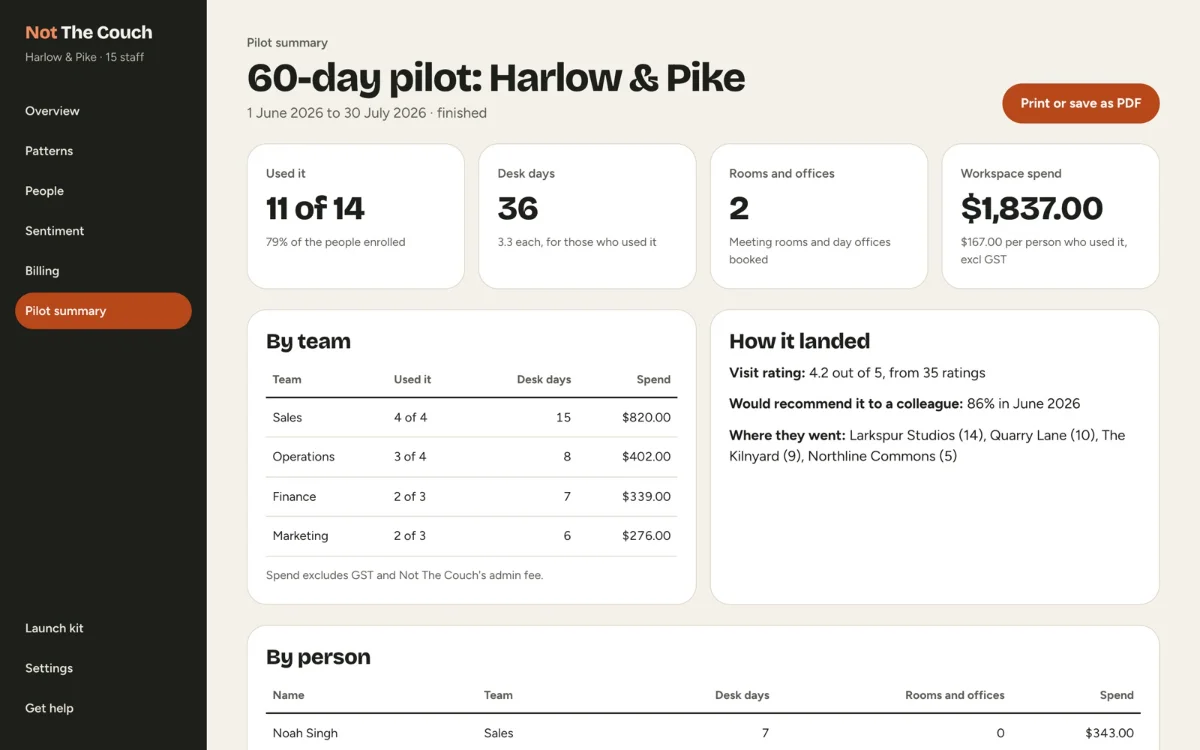
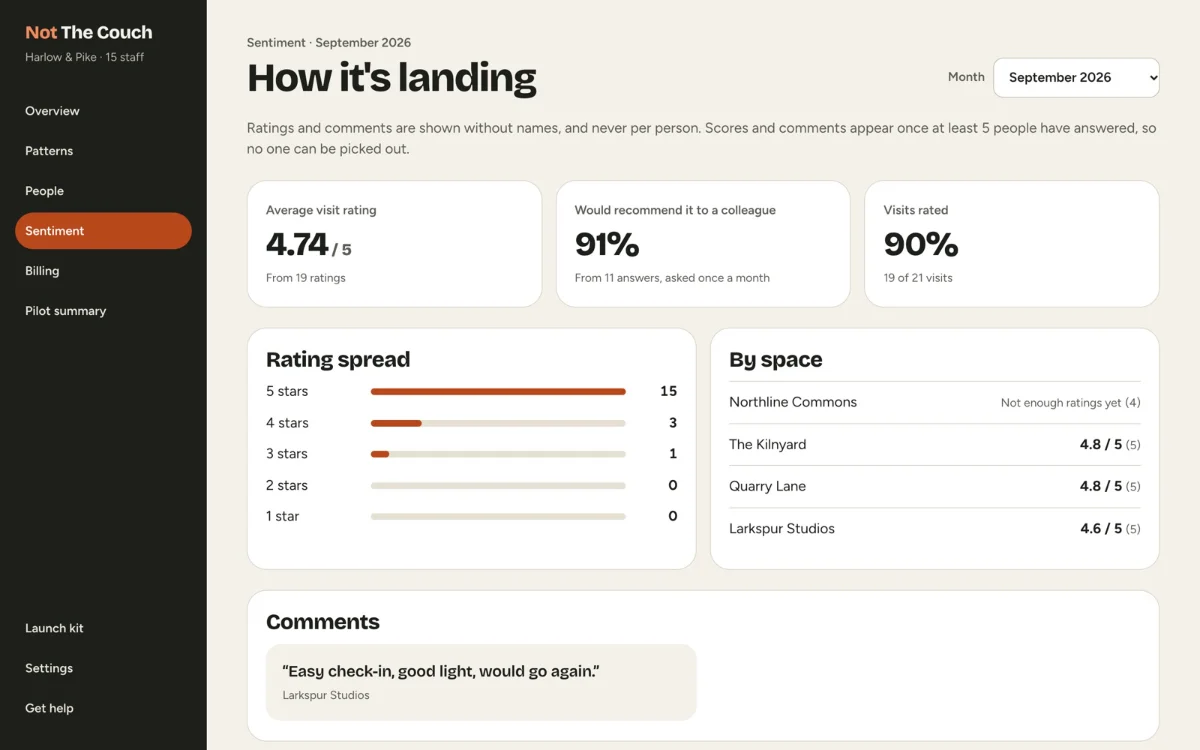
Screens and videos from a demo company. Harlow & Pike, its people and its spaces are made up.
How it works
-
Add your team
Add names and emails, and choose how many days a month each person gets.
-
They check in with their phone
Your people pick a space near home or wherever they are that day, check in at reception, and get to work. Desk, meeting room or office.
-
You get one invoice
One monthly invoice in NZD, emailed to your accounts team with your PO number. Usage by person, team and location is on your dashboard.
-
List your space
Five minutes. Photos, desks, rooms and offices, and you see your listing as you go.
-
Confirm a few details
The basics we check for every space: your business, the building, health and safety. Mostly tick boxes.
-
Welcome their people, get paid
Network users check in at your reception, and you confirm any room bookings. You're paid monthly for what's used, at the rate you set.
What it costs
Simple, usage-based pricing you can model before you talk to anyone. You only pay for the days your people use, up to the allowance you set.
Designed to be FBT-free. It's a place for your people to do their work, and it's for work only, not a private perk. Check with your adviser.
Indicative pricing, excluding GST. Each space sets its own prices, the same as it charges walk-in customers, so there's no mark-up. Desk days can vary a little between spaces, and meeting rooms and private offices are priced by the space. You set a monthly budget for workspace use, and it's never exceeded. Full pricing, with examples.
Up to 20 people? Set it up yourself for $5 a person a month, paid by card, with no admin fee for your first month.
Model it for your team
Assumes every allocated day is used, so this is the most it would cost. You're only billed for days actually used.
How it compares
| What you get | Not The Couch | Work-from-home allowance | Coworking memberships | A satellite office |
|---|---|---|---|---|
| A proper place to work | Yes | No, still at home | Yes | Yes |
| Near where each person lives | Yes, any space in the network | Home | One space per membership | One location |
| Time back from the commute | Yes | Yes | Depends where it is | Only for people nearby |
| Don't pay for days not used | Yes, capped by your budget | No, paid regardless | No, a monthly fee each | No, a lease |
| See whether it's used | Yes, by person and team | No | Rarely | Partly |
| Admin for you | One monthly invoice | Through payroll | One account per person | Lease, fit-out and facilities |
| Commitment | Month to month, after a 60-day pilot | None | Monthly, per person | Multi-year lease |
A general comparison: allowances, memberships and leases vary. Check the tax treatment of any benefit with your adviser. More in our guide: Work-from-home allowance or a workspace benefit?
The Not The Couch Standard
Wherever your people check in, the space meets the same standard. Before a space joins, the operator confirms everything here and re-confirms it every year. We spot-check every space (sometimes unannounced), can ask for its insurance certificate at any time, and pause any space that stops meeting it.
You keep your health and safety duties to your people. This is how we make them easier to meet. How we check every space
- Public liability insuranceAt least $2m, declared by the operator
- Emergency proceduresShown to your people on their first visit
- First aid on siteKit plus a trained first aider or contact during listed hours
- Hazard registerMaintained and reviewed at least yearly
- Incident reportingIncidents involving your people reported to us within 24 hours, and on to you
- HSWA duties acknowledgedOperators consult, cooperate and coordinate with you on overlapping duties
- Privacy Act 2020Check-in data used only to run the service
- Accurate listingsDesks, rooms, hours and photos reflect reality
- Building safetyCurrent building WOF (or confirmation one isn't required), with the seismic rating (%NBS) shown on each space
- SustainabilityRecycling on site, and committed to reducing their carbon and waste footprint
Start small. Scale when it works.
The 60-day pilot
- 5 to 20 of your people, in Christchurch to start
- The admin fee is half price for the 60 days, or nothing at all for our first five founding customers, in return for a short case study
- A launch kit: staff announcement, benefit policy template and employee privacy notice
- A day-60 report on usage by person and team
- No obligation to continue
Controls you'll need
Available now
- Allowances set per person, or for groups you name yourself
- Choose who can book meeting rooms and day offices
- A monthly budget that's never exceeded: check-ins stop at the cap, and you're emailed
- Usage by person and team, and by location if you switch on visit detail
- Spend by team for cost-centre coding, on your dashboard and in your monthly report
- Invoices emailed to your accounts team, with your PO number
- Single sign-on with Microsoft and Google
- Add and remove people any time
On the roadmap
- HR system sync, starting with Employment Hero
- Manager approvals
Enterprise and procurement packs: company details, insurance, security and data handling, privacy and our standard terms. Request them, or see Security and data.
What happens after you get in touch
- A 30-minute callBook a time that suits you, or we'll be in touch within 1 working day. Where your people live, how many days, and what you'd like to see by day 60.
- Set up in a dayAdd your people with names and emails, set their days and your budget, and send the staff announcement from your launch kit.
- Day 60: decideYour pilot summary shows uptake, spend and ratings. Keep going month to month, grow it, or stop.
Why employers sign up
Flexible work is already here. Not The Couch gives it somewhere good to happen.
Request a pilot-
It's the benefit people actually want
Flexibility tops the list of what New Zealand workers want from their job. This makes it a metric worth tracking, not just permission to stay home.
-
Time and money back, without a pay rise
Fewer trips into town means hours back each week and less spent on petrol and parking. It's real help with the cost of living that doesn't add to your salary bill.
-
A reason to join, and to stay
"A workspace near home, on us" is a line candidates notice in a job ad. It shows you trust people to work flexibly, and gives them somewhere good to do it.
-
Home isn't an office
Calls from the kitchen. Kids home sick. Nowhere to meet a client. Your people get a proper desk and a meeting room near home or on the road, at professionally run workspaces.
-
Regional staff without a regional office
Got three people in Christchurch and a head office in Auckland? Give them a real place to work without signing a lease for it.
-
Pay for what's used, not empty desks
No leases and no 24-month contracts. You set an allowance per person and only fund the days your team uses.
-
Close to zero admin
Add your team with names and emails. They check in with their phone. You get one monthly invoice in NZD, GST included.
-
See exactly what you're paying for
Usage by person and team, ready to allocate to cost centres, and by location if you switch on visit detail. Your people see the same data you do, so there are no surprises.
Why workspaces join
An NZ network for independent workspaces. Your space, your community, more of the right people through the door.
Start sign-up-
Employer demand you can't reach alone
National employers won't sign fifteen separate contracts. We sign one, and their people walk through your door.
-
You set your rate
Employers pay the same prices you charge walk-in customers, for the desks, rooms and offices you choose to list.
-
Your members stay yours
We never market Not The Couch to your members. We're here to bring new people in, and regulars who love your space can move onto your memberships.
-
Fill the quiet days
List the desks and meeting rooms you'd like to see used more, like Mondays, Fridays or that room nobody books.
-
Light to run
No listing fee. People check in at your front desk, you confirm room bookings by email, and you get paid monthly. We look after the employers, the billing and the questions.
-
Have a say
Workspaces in the network get a say in how it runs, from the standards to the rules of the road.
Free resources for HR
Hybrid work policy template
A ready-to-edit hybrid and flexible work policy: where people work, working patterns, flexible work requests, health and safety, costs and privacy, plus a home workspace self-check.
The business case for your CFO
One page: the problem, what it costs per person, how the budget cap works, what you'll measure, and how to run the pilot.
Enterprise and procurement packs
Company details, insurance, security and data handling, privacy, the Not The Couch Standard, a completed security questionnaire and our standard terms.
Questions
The basics
What is a workspace benefit?
A workspace benefit is an employer-paid allowance of desk days and meeting rooms at professional workspaces, so staff can work near home, in town or wherever suits the day. With Not The Couch, you set each person's days and a monthly budget, and pay for the days used on one monthly invoice. More about workspace benefits.
How much does it cost?
An admin fee of $8 a month for each person enrolled, plus the desk days they actually use at each space's walk-in price (in Christchurch, about $49 a day), up to the monthly budget you set. Teams of up to 20 can set it up themselves for $5 a person a month, paid by card. Prices exclude GST. See full pricing or model it for your team.
Is there a minimum team size or contract?
No long-term contract. Start with a 60-day pilot for a handful of people, then decide.
Where are the spaces?
Live in Christchurch now, and growing where your people are: see them on Find a space. Tell us where your people are and we'll prioritise new spaces there.
What happens if a space is full?
Each space decides how many desks it makes available to the network. If your nearest one is full, we'll point you to the next closest space. Meeting rooms and offices depend on what's free, so the space confirms each booking.
When can my people use it?
Weekdays, during each space's opening hours. Check-ins close at 5pm, and there's no weekend or after-hours access.
What can we see about our team's usage?
Days used by person and team, so you can manage the benefit and allocate costs. If you switch on visit detail, you also see which space each person used and when; your people are told before their first check-in. There's no live location tracking, and your people can see the same information you can.
Who's responsible for health and safety?
Every space in the network is a professionally run workplace with its own health and safety duties. You keep your duties to your people as their employer, and we help you coordinate with the spaces they use.
Is it a taxable benefit?
It's designed not to be. Workspace access through Not The Couch is a place for your people to do their work, and it's for work only, not a private benefit, so it's designed to be FBT-free. As with any tax question, check it with your own adviser for your situation.
For HR and reward
How do we make it fair for people who can't use it?
Set it up in groups. Office-based and hybrid staff might get a few days a month; people in frontline roles can use it for training, planning or admin days, or not at all. You decide who's enrolled and how many days each group gets, and you can change it any time.
What if nobody uses it?
You only pay for the days people use, plus $8 a month for each person you enrol, so a quiet month costs very little. Our launch kit gives you a staff announcement, a policy and a privacy notice, and your dashboard lets you send a friendly reminder to anyone who hasn't started. The 60-day pilot summary shows you exactly what uptake looked like.
Can we start with one team?
Yes. Most pilots start with 5 to 20 people. Add more people, or another team, whenever you're ready.
Does it replace our office?
No. It works alongside your office and your hybrid policy. People use it on the days the office isn't the best place to be: a quiet day near home when they live a long way out or have school pick-up, a change of scene in town, a client meeting in a better room, or a day with the whole team somewhere new.
How do we stop it being misused?
It's for your work only, on weekdays, and each person agrees to that before their first check-in. You set each person's days and a monthly budget that's never exceeded, and if you switch on visit detail you see where and when each person checked in.
Can it go in our total reward statements?
Yes. Download usage and spend by person each month as a spreadsheet, ready for reward statements, cost centres or payroll reporting.
How do we budget for it?
Use the calculator above: people, times days a month, times a typical $49 a day, plus $8 a person. Set that as your monthly budget and it's never exceeded; unused budget isn't charged.
What does it cost to join?
Nothing. There's no listing fee. You set a wholesale rate for what you list, and we pay you monthly for what gets used.
Will this undercut my memberships?
No. You choose what you list and at what price, and we never market Not The Couch to your members. We're here to bring new people in, and regulars who love your space can move onto your memberships.
Is Not The Couch part of Works?
No. Not The Couch Limited is a separate company. Works is one operator on the network, on the same terms as everyone else. Our founder, Leon Mooney, also owns Works and the company that runs PTL Studios.